A homeowner in San Clemente with a leaking water heater is not browsing. They are standing in a garage with a phone in one hand, tapping the first three results Google gives them. If your site is still drawing itself when they get impatient, they hit back and call the next guy. That is the whole problem with a slow contractor site, and it is fixable.
Most of the slow sites we look at are slow for the same short list of reasons: photos straight off a phone camera, a pile of plugins and tracking scripts, and cheap shared hosting. None of that requires a rebuild to diagnose. Here is how to check your own site and what to do about what you find.
Measure It Before You Change Anything
Go to pagespeed.web.dev, paste in your homepage, and let it run. It is free, it is Google's own tool, and it is the same data Google uses when it evaluates your pages.
Two things to know when you read the report. First, look at the mobile tab, not desktop. Mobile is throttled to imitate a mid-range phone on a cell connection, which is much closer to how your customers actually see your site than a desktop on office wifi. Second, the report has two halves: lab data, which is a simulated run useful for debugging, and field data, which is real visitor experience collected over the previous month. Low-traffic sites often have no field data yet. That is normal.
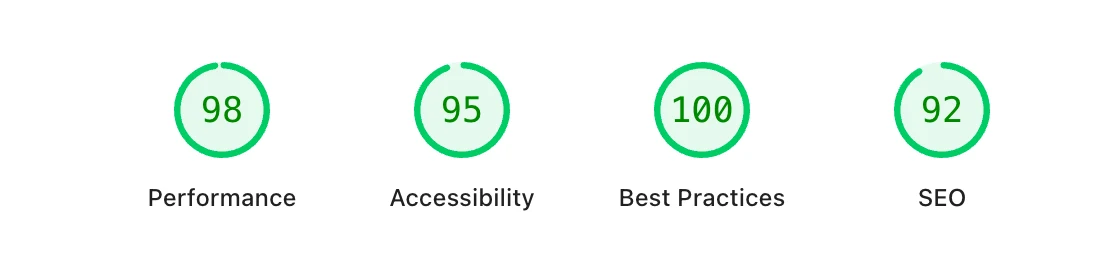
Google grades the performance score in three bands: 90 and above is good, 50 to 89 needs work, and under 50 is poor. Run the test on your homepage and on your two busiest service pages, because they are rarely built the same way.
The Three Numbers That Matter
Ignore the score for a second and look at the Core Web Vitals. These are the thresholds Google publishes, and they are the ones tied to search:
- Largest Contentful Paint (LCP), under 2.5 seconds. How long until the biggest thing on screen finishes loading. On a contractor site that is almost always the hero photo.
- Interaction to Next Paint (INP), under 200 milliseconds. How fast the page reacts when someone taps Request a Quote. Heavy scripts are what make this bad.
- Cumulative Layout Shift (CLS), under 0.1. How much the page jumps around while it loads. If someone reaches for your phone number and an image pushes it down, that is CLS.
Two supporting numbers are worth a glance. Time to First Byte tells you how long your server took to respond at all, and Google's good threshold is under 800 milliseconds. If yours is way over that, no amount of image work will save you, because the problem is upstream at your host. First Contentful Paint, good under 1.8 seconds, tells you when the visitor first sees anything at all.
Images Are Almost Always the Culprit
Job photos are the single biggest thing we strip out of slow contractor sites. A phone shoots a 12 megapixel photo, someone uploads it straight to the gallery, and now a page that should weigh a few hundred kilobytes weighs eight megabytes. On a strong wifi connection you will never notice. On a phone in a canyon in San Juan Capistrano with two bars, that page never finishes.
Four fixes, in the order they pay off:
- Resize before you upload. Nothing on a website needs to be 4,000 pixels wide. A hero image around 2,000 pixels and gallery photos around 1,600 are plenty. Thumbnails can be 400.
- Compress to about 80 percent quality. On a job photo the difference is invisible and the file gets dramatically smaller. Any free image compressor will do this.
- Save as WebP or AVIF. Both are supported by every browser your customers use, and both produce much smaller files than JPEG at the same quality. This is the default we build with.
- Lazy load everything below the fold. Add
loading="lazy"to gallery images so the browser only fetches them as the visitor scrolls down.
One Exception
Never lazy load your hero image. It is the thing LCP is measuring, so it should load first. Give it fetchpriority="high" instead, and set width and height on every image so the layout stops jumping.
Clean Up the Code and Scripts
After images, the next weight is everything the page has to download and run before it becomes usable.
Minify your CSS and JavaScript, which just means stripping out the spaces and comments the browser does not need. Turn on Brotli or Gzip compression at the server so files travel smaller. Add defer to scripts that do not need to run before the page paints, so they stop blocking it. Most modern hosts and caching plugins can do all three from a settings screen.
Then audit what you are actually loading. Chat widgets, review carousels, three separate analytics tags, a booking embed you stopped using two years ago. Every one of those is a request that competes with your phone number for the visitor's patience. Cut anything that is not earning its place.
Browser caching handles the repeat visitor. Set a long Cache-Control max-age on things that rarely change, like your logo and stylesheets, and the second visit loads almost instantly because most of the site is already on the phone. Use versioned filenames so people still get the new version when you change something.
Build for the Phone First
Nearly all of the traffic on our clients' sites in South OC comes in on a phone, and emergency work skews even harder that way. Designing the desktop site and shrinking it down produces a page that technically fits and practically does not work. A few things we hold every build to:
- A tap-to-call button visible without scrolling, on every page.
- Tap targets at least 44 by 44 pixels, with space between them so a thumb cannot miss.
- Body text at 16 pixels or larger so nobody has to pinch to read your service list.
- Quote forms down to four or five fields: name, phone, project type, and a short note.
Then test it for real. Turn off wifi, pull the site up on your own phone from a truck in Dana Point or Laguna Niguel, and count the seconds. Simulations are useful. Your own thumb on a cell connection is the truth.
Hosting Sets Your Ceiling
You can optimize everything on the page and still be slow if the server is slow. That is what Time to First Byte is telling you. Cheap shared hosting puts your site on a machine with hundreds of others, and when one of them gets busy, yours crawls.
When you are comparing hosts, the things worth checking are an uptime guarantee of at least 99.9 percent, SSD storage, a content delivery network so your pages are served from somewhere near Southern California instead of across the country, and included SSL and daily backups. Also look at the renewal price, not the introductory one. The cheap first year is usually followed by a much less cheap second year.
Managed hosting costs more and removes most of this from your plate: updates, caching, backups, and a staging copy so you are not testing changes on the live site while a customer is on it.
The Short Checklist
- Run PageSpeed Insights on the homepage and your two busiest service pages, mobile tab.
- Resize, compress, and convert every photo to WebP or AVIF.
- Set width and height on images, lazy load below the fold, prioritize the hero.
- Minify CSS and JS, enable text compression, defer non-critical scripts.
- Delete plugins, widgets, and tracking tags you are not using.
- Turn on browser caching for static files.
- Check TTFB. If it is bad, fix the host before anything else.
- Load the finished site on your own phone, off wifi, and time it.
When Speed Is Not the Real Problem
One honest caveat. If your site is built on a page builder with a dozen plugins layered on top, you can spend a weekend on all of this and claw back a couple of seconds, then watch it slip back the next time something updates. At that point the platform is the bottleneck, and patching it is throwing good money after bad.
- Your mobile score sits under 50 even after the images are fixed.
- Speed goes backwards every time a plugin updates itself.
- Nobody can tell you what half the installed plugins are doing.
If two of those three are true, the fastest path is a clean build rather than another round of tuning. Either way, start by running the test. You cannot argue with the number, and it takes a minute.