A construction company website has one job: turn somebody who is comparing three contractors into somebody who calls you. In San Juan Capistrano that person is usually on a phone, usually in a hurry, and usually looking for proof that you have already done work like theirs, close to where they live.
Everything below is built around that. If a design choice does not help a homeowner or a property manager understand your work and reach you, it is decoration.

Navigation Somebody Can Follow in Ten Seconds
Keep the top menu to five items or fewer. Services, Projects, Service Areas, About, Contact covers almost every contractor we build for. Anything else goes in the footer.
- Put the phone number in the header on every page, and make it a real tap-to-call link. A lot of construction leads never fill out anything. They tap and talk.
- Name your pages the way people describe the work. "Custom Homes" and "Commercial Tenant Improvements" tell a visitor more than a single vague "Services" tab, and they give search engines something specific to rank.
- One obvious primary button. "Get a Free Estimate" in a color that does not appear anywhere else on the page. If three buttons compete, none of them wins.
- Footer carries the trust details: license number, service areas, hours, email, and a physical city. People do look these up before they call.
Your brand should be consistent from the truck to the site. If the wrap is navy and orange, the site is navy and orange. It sounds cosmetic, but a homeowner who saw your truck on their street two weeks ago recognizes it, and recognition is most of the sale.
Show the Work the Way People Search for It
Your portfolio is the page that closes. Organize it two ways at once: by type of work, and by city.
By type, that usually means categories like custom homes, additions, kitchen and bath remodels, outdoor living, and commercial build outs. By city, it means San Juan Capistrano first, then the places you actually take jobs: Dana Point, San Clemente, Capistrano Beach, Laguna Niguel, Mission Viejo. Somebody in the historic district near the mission wants to see that you have worked on an older property in that part of town, not a project photo from ninety miles away.
For each project, give people something to read, not just a slideshow:
- The city, the scope, and roughly how long it took
- What made it complicated: a hillside lot, a tight downtown setback, matching Spanish colonial revival detailing, working around an occupied home
- Before and after photos, in that order, at the same angle
Name the city, never the client's address. And use your own photos. Stock images of anonymous crews in clean hard hats read as fake to anyone who has hired a contractor before. Your team, your trucks, your job sites, even the ones shot on a phone, beat a polished stock library every time.
Build for the Phone First
Most of the contractors we work with see the majority of their traffic come from phones, and a good share of it in the evening. Design for that screen first and let the desktop version be the easy one.
- Menu collapses, photos stack. Galleries should swipe, and a tap should open the photo big enough to see the tile work or the framing detail.
- Buttons big enough for a thumb, with space around them, so nobody taps the wrong thing while standing in a driveway holding a set of plans.
- Short forms. Name, phone, project type, ZIP. That is enough to call them back. Save the detailed questionnaire for the conversation, because a long form on a small screen is where leads quit.
- A sticky call button along the bottom on mobile. It is the single highest converting element on most contractor sites we build.
Speed: Your Photos Are the Problem
Construction sites are slow for one reason. They are full of huge project photos straight off a camera or a phone, uploaded at full resolution.
Fix it in this order. Export images at the size they actually display and save them in a modern format like WebP, which is meaningfully smaller than the same JPEG at the same quality. Lazy load anything below the fold so the gallery does not download all at once. Put the site on hosting that does not fall over, ideally behind a CDN. Then go delete the widgets: chat popups, social feeds, and half-forgotten tracking scripts pile up and every one of them costs load time.
Test it on cell service, not on the office WiFi. Plenty of your visitors are parked in a driveway on a marginal signal.
Quick Check
Open your own site on your phone, on cell data, and count how long the project gallery takes. If you get bored, so does the homeowner.
Getting Found in San Juan Capistrano
A good site that nobody finds is a brochure in a drawer. Local search is where the work comes from, and for a contractor it comes down to a short list of things done properly and kept current.
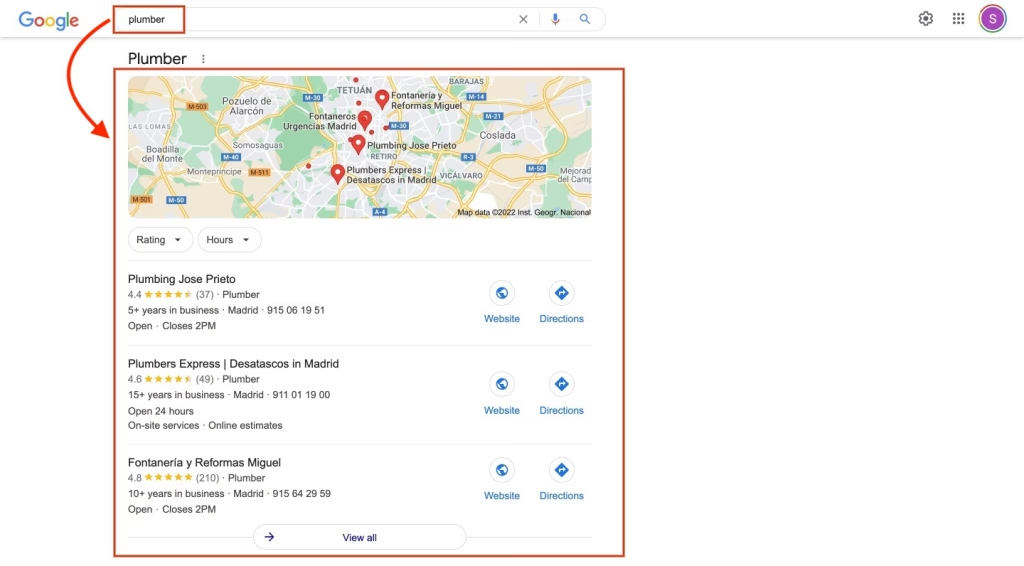
Google Business Profile. This is the map listing that shows up above the regular results when somebody searches for a contractor near them. Fill in every field: categories, service area, hours, phone, and photos of real jobs added regularly. An abandoned profile ranks like an abandoned profile.
Reviews, and replies to them. Ask at the walkthrough, when the client is happiest. Respond to all of them, including the bad one, calmly and in public. Prospects read the reply more carefully than the complaint.
A real page for each city you serve. One page for San Juan Capistrano, one for Dana Point, one for San Clemente, and so on. Real pages, with projects from that city and details specific to it. Copying a page and swapping the city name is obvious to a reader and does nothing for rankings.
Consistent business information everywhere. Your name, address, and phone number should match exactly across your site, your map listing, and the directories that list contractors. Old suite numbers and a tracking number from a lapsed ad campaign are the usual culprits.
Schema markup. Structured data in the page code tells search engines what your services, service areas, and contact details are, instead of asking them to guess from the layout. It is also increasingly how AI answer engines pull a business into a response.
Search Console and Analytics. Connect both. You want to know which pages bring calls and which searches you already rank for, so the next month of work is aimed at something real instead of a hunch. Our local SEO work starts here for every client.
What Usually Costs Contractors Jobs
- Stock photos where the portfolio should be
- A phone number buried on the contact page only
- No license number anywhere on the site
- A gallery that crawls on cell service
- A form nobody monitors. Send submissions to a phone, not to an inbox you open on Sundays.
Where to Start
If you only do three things this month: get the phone number tap-to-call in the header, rebuild the portfolio around your last ten real jobs sorted by city, and compress the photos. That combination moves more work than a full redesign does, and you can do all of it without touching the rest of the site.
After that, the local search side is what compounds. A complete map listing, steady reviews, and a genuine page for each city you serve will keep producing long after the build is finished. If you want to see how this maps onto your own market, our San Juan Capistrano page covers what we do here.