Nobody standing in a flooded laundry room types a keyword. They hold down a button and say "find a plumber in San Clemente open right now." Voice queries are longer, more urgent and more local than typed ones, and the site that answers the question in plain English is usually the one that gets the call.
The good news for contractors: none of this requires new technology. It is the same website you already have, rewritten so a person and a machine can both find the answer in one pass.
What Voice Search Actually Changes
Three things are different when someone speaks instead of types:
- The phrasing is a full sentence. Not "roof repair Dana Point" but "who can fix a roof leak in Dana Point today?"
- The intent is hotter. People speak a search when their hands are full or the problem is urgent. That caller is ready to hire, not researching.
- The result is one answer, not ten links. An assistant reads back a business or a sentence. If your answer is buried under three paragraphs of company history, it does not get read.
Step 1: Use the Words Homeowners Actually Say
You already own the best keyword research there is. Your call logs, your form submissions, your text threads and your estimate requests are full of the exact phrasing people use when they need you. Read back through a month of them and write down the wording that keeps repeating.
Look for three patterns:
- Urgency words: open now, tonight, same day, emergency, weekend.
- Place words: city names, neighborhoods, ZIP codes, landmarks people use instead of city names.
- Service words in customer language: water heater, roof leak, panel upgrade, popcorn ceiling. Not the industry term you use on an invoice.
Your Google Business Profile has a Q&A section that most contractors ignore. Post your five most common questions there and answer them yourself, in plain language. It takes twenty minutes and it is one of the few places you control both the question and the answer.
Send Each Question to the Right Page
Once you know the phrasing, match each phrase to the page that should own it. The instinct is to cram everything onto the homepage. That backfires: a page that tries to answer twelve questions answers none of them clearly, and the assistant moves on.
| What They Say | Page That Should Answer It |
|---|---|
| "Roof leak repair near me" | Roof repair service page |
| "AC repair open Sunday in San Clemente" | Emergency HVAC page |
| "How much does water heater replacement cost?" | Plumbing pricing or FAQ section |
| "Licensed electrician open right now" | Emergency electrical page |
| "Bathroom remodel cost in Dana Point" | Dana Point location page |
Step 2: Put the Answer in the First Sentence
Swap flat headings for the question a homeowner would say out loud. Instead of "Storm Damage Services," use "How fast can you repair storm damage?" Then answer it immediately: "We inspect storm damage within 24 hours and can usually tarp the same day."
Everything else on the page still belongs there. The photos, the process, the warranty, the call to action. It just goes after the answer instead of before it.
The Rule
Answer first. If the direct answer is not in the first sentence under the heading, assume nobody reads it.
Be Specific Enough to Quote
Vague answers give an assistant nothing to read back. Use concrete formats:
- Price ranges in dollars, like $150 to $300, not "competitive pricing."
- Hours in normal 12-hour time, like 8:00 AM to 6:00 PM, plus what happens after hours.
- Timelines in plain units, like 3 to 5 days, not "it depends on the scope."
Put those questions on the service page and the location page they belong to, not on one orphaned FAQ page at the bottom of the nav. A question about emergency plumbing in San Juan Capistrano should sit on the emergency plumbing page and the San Juan Capistrano page, where the rest of the context already lives.
Step 3: Make Your Local Data Agree With Itself
Once your page answers the question, the assistant does one more check before it recommends you: does this business look real and nearby? It confirms that by comparing your name, address and phone number across your site, your Google Business Profile and the directories. When those disagree, you look less trustworthy than the shop whose details match everywhere.
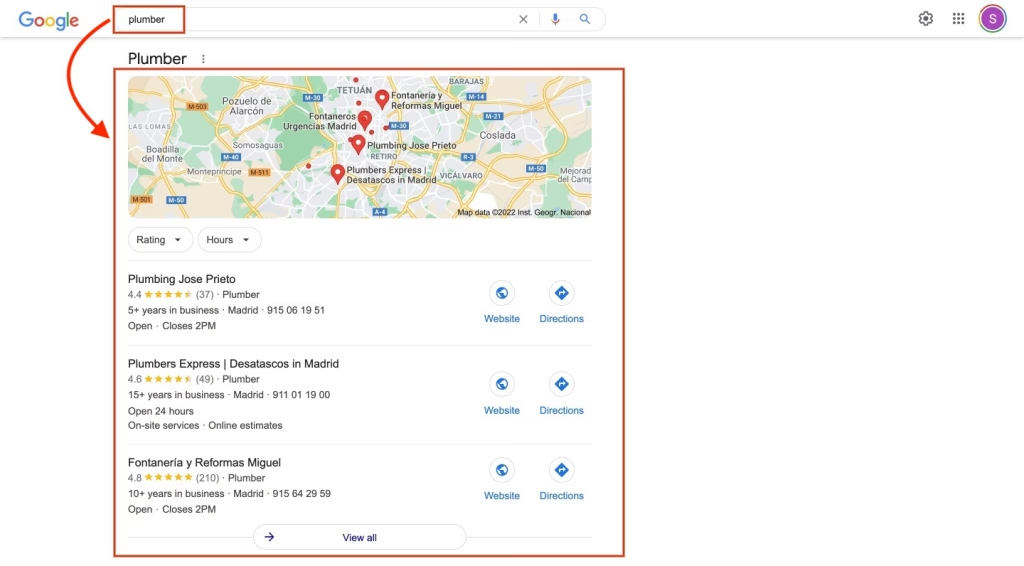
Fix these, in this order:
- Business name: use the exact name on your license. No keyword stuffing in the name field. It gets flagged, and it makes an assistant read back something no customer recognizes.
- Address format: pick one version and use it everywhere. "St." and "Street" on two different listings is enough to muddy the signal.
- Phone number: one local area code number across every listing. Toll free numbers read as regional, not local.
- Hours: this is the one that quietly costs jobs. Somebody asks for an electrician open now, your profile still shows last year's hours, and you are skipped. Update holiday hours before the holiday.
- Service areas: name the cities. "All of Southern California" matches nothing. San Clemente, Dana Point and San Juan Capistrano match three real searches.
Reviews That Say the Service and the City
The star rating helps you get considered. The text inside the review is what ties you to a specific job in a specific place. A review that reads "replaced our water heater in Dana Point, out the same afternoon" does more for a spoken "water heater repair Dana Point" than five reviews that just say "great service."
You do not have to script anybody. When you ask, ask for the detail: what did we do, and where. Then reply to every review, good or bad. An active profile reads as a business that is still operating.
Step 4: Speed and Schema
Voice searches happen on a phone, often on cell service, usually when something is broken. A page that takes its time is a page nobody waits for.
For most contractor sites the fix is unglamorous: the photos. Job site pictures straight off a phone are enormous. Compress them before they go up, serve them in a modern format, and the page gets faster without touching anything else. While you are in there, make sure the phone number is a real tap-to-call link, near the top, on every page.
Schema markup is the other half. It is code in the background that tells search engines exactly what they are looking at instead of making them guess. Three types matter for contractors:
- LocalBusiness confirms your business type, address, phone and hours.
- Service separates each offering, so "emergency pipe repair" and "water heater installation" are two distinct things rather than one vague label called plumbing.
- FAQ wraps the questions and answers you just wrote in a structure built for exactly this. It is the cheapest one to add and the closest match to how voice search works.
Add a plain text llms.txt file at the root of your site too, listing your services and service areas in ordinary language. It is a small file, and it gives AI crawlers a clean summary instead of asking them to piece one together.
The Hour Version
If you only have one hour this week, do these five things in order:
- Open your Google Business Profile and fix the hours, the service areas and the phone number.
- Search your own business name and compare the address on the first three listings you find. Fix any that differ.
- Take your three most common phone questions and add each one, as a question heading with a one sentence answer, to the matching service page.
- Load your site on your own phone, off wifi. Time it. If you are still waiting, the photos are the culprit.
- Ask your next three happy customers to mention the job and the city in their review.
None of this is a trick. Clear answers, local details that match, and a site that loads. That is what a voice assistant is looking for, and it is the same thing a homeowner standing in a wet garage is looking for.