Almost nobody replaces their website because it looks dated. They replace it because it stopped bringing in work. Usually those are the same problem showing up in two different places. Here are the ten signs worth checking before you spend a dollar.
1. It Looks Like It Was Built a Decade Ago
Nobody hires you because your website is pretty. They pass on you because it looks neglected. Stock photos with a watermark still on them, a logo saved at the wrong size, three fonts fighting each other, a copyright line in the footer that stopped at 2018. People read all of that as a signal about how you run a job site.
The test is simple. If your truck wrap, your storefront, and your business cards look sharper than your website, that gap is costing you. Most sites earn a real look every three years or so.
2. It Falls Apart on a Phone
Pull your site up on your own phone right now, on cell service, not on your shop wifi. If you have to pinch and zoom to read a paragraph, if buttons sit too close together to tap cleanly, if your phone number is baked into an image instead of being a tap-to-call link, you have a mobile problem.
This is not just an annoyance. Google indexes the mobile version of your site first, so the phone layout is the one deciding your rankings. And in San Juan Capistrano, Capistrano Beach, and Dana Point, most people look for a contractor while they are standing in the problem: water on the garage floor, a cracked driveway, a fence panel down after a wind night. They are on a phone, in a hurry, and they will not fight your site.
3. It Takes Too Long to Load
Run your homepage through Google PageSpeed Insights. It is free and takes about a minute. Google's own Core Web Vitals guidance puts a good Largest Contentful Paint at 2.5 seconds or less, so that is the number to aim at.
When a site is slow, the cause is almost always on this short list:
- Huge uncompressed images straight off a phone camera
- A stack of plugins nobody has audited in years
- Cheap shared hosting with no caching turned on
- Bloated theme code loading things your pages never use
The first two you can often fix without touching the design. If the platform itself is the bottleneck, patching it is throwing good money after bad.
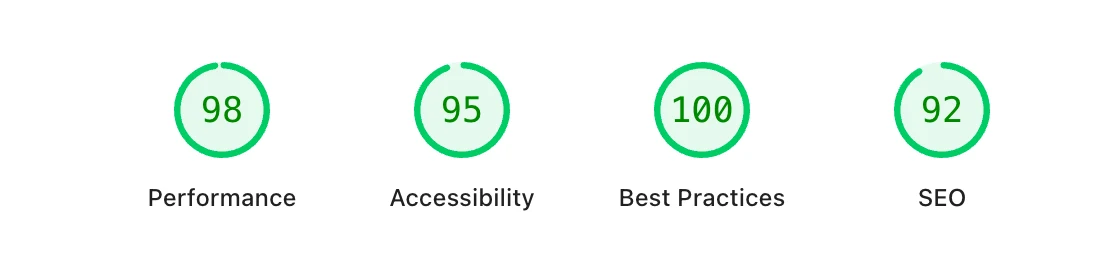
4. Traffic Comes In and Nothing Happens
If people are landing on your site and the phone is not ringing, that is a design problem, not a traffic problem. Four things to check yourself:
Is your phone number visible without scrolling, on every page, on a phone as well as a desktop? Does your contact form actually deliver? Submit it yourself and watch for the email, because dead forms are one of the most common things we find on sites that were built and then left alone. Does each page have one obvious next step, or five competing ones? And do your service pages tell someone what the process and the rough range look like, or do they just say quality workmanship and family owned?
5. Your Branding Does Not Match Anymore
Businesses update the logo, repaint the truck, change the tagline. The website usually gets left behind. Now a customer sees one version of you on your vehicle and a different one online, and the mismatch reads as sloppy even when they cannot say why.
In a small market where a lot of your work still comes from referrals and neighbors, that consistency matters more than it does anywhere else. The name they were given has to match the site they land on.
6. You Cannot Update It Yourself
If changing your holiday hours means emailing a developer and waiting a week, you will stop making changes. Then the site goes stale, and stale is the state most bad websites die in.
You should be able to swap a photo, post a job you just finished, add a service, or fix a typo without opening a support ticket. Anything more painful than that and you are effectively renting a brochure you are not allowed to touch.
7. Broken Links, Dead Pages, and Forms Nobody Tested
Click every link in your navigation. Load every service page. Submit your own quote form. Check that the map embed points at your current address and not the office you left two years ago.
Broken things pile up quietly, usually after a move, a rebrand, or a service change. Visitors bail when they hit a dead end, and search engines crawling the same dead ends have no reason to keep sending people your way. Put a quarterly reminder on your calendar to walk your own site like a customer would.
8. The Browser Says Not Secure
If your address bar shows a Not Secure warning, you have lost the visitor before they read a word. SSL certificates are free and standard on any modern host, so there is no reason to be without one.
Security is rarely the only thing wrong, though. A site sitting on an unmaintained platform with no backups and abandoned plugins is telling you something bigger about its condition.
The Two Minute Check
Open your site on your phone, on cell service. Time how long it takes to load, tap your phone number, and submit your own contact form. If any of those three fails, you already know where to start.
9. Nobody Can Find You in Search
Open an incognito window and search your main service plus your city. If you are nowhere, the site is not doing the one job that pays for itself.
The usual causes: no dedicated page for each service you sell, no page for each city you actually serve, thin copy that says nothing specific, business details that do not match what is on your Google Business Profile, and a profile nobody has touched in a year. Some of that you can fix on the site you already have. If your pages cannot be edited independently, or every page on the site shares one title tag, you are structurally capped and no amount of writing fixes it.
Our local SEO work starts with exactly this audit, because there is no point ranking a site that cannot convert.
10. Your Business Changed and the Site Did Not
You added a service, dropped one, moved, hired a crew, or shifted from residential to commercial. The site still sells the version of you from three years ago.
Here is the tell most owners miss: if you are getting calls for work you no longer want, your website is doing its job perfectly for the wrong job. That is worth fixing sooner than a dated color scheme.
Quick Fix or Full Rebuild?
Not everything on this list needs a new website. Compress your images, fix the broken links, add the SSL certificate, make the phone number tappable, update the footer year. That is an afternoon, not a project, and you should do it before you spend anything.
Rebuild when one of these is true:
- The platform fights you every time you try to change something
- The mobile layout cannot be fixed without rewriting the templates anyway
- The structure has no room for the service and city pages you need to rank
- You would hesitate to text the link to a customer standing in front of you
That last one is the honest test. A website is a sales tool. If you would not hand it to a prospect, it is not doing the work, and no amount of patching changes that.