Nobody hires a contractor blind. Before a homeowner ever picks up the phone, they open your website and run a quiet little interview: what do you do, do you work in my town, can I trust you inside my house, and how do I reach you. The whole thing takes seconds, and you do not get to sit in on it.
The good part is that the questions never change. Once you know what people are checking, you can build a site that answers all four before anyone thinks about hitting the back button.
The Four Questions Every Visitor Asks
- What do you actually do? Not your philosophy. The trade.
- Do you work where I live? A homeowner in Dana Point wants to see Dana Point, not "the greater metro area."
- Can I trust you? Real photos, real reviews, a license number, proof of insurance.
- How do I reach you right now? Preferably without filling out anything long.
Miss one and the visit usually ends. Most contractor sites we look at answer one or two of these well and bury the rest on an About page nobody opens.
Your Homepage Gets About Five Seconds
Above the fold, before any scrolling, your homepage has to say the service, the place, and the next step. A headline like "Quality You Can Trust" burns that window and tells a visitor nothing. It could be a roofer, a dentist, or a bank.
Use a plainer formula: problem, service, next step. "Roof leaking? Free inspection in San Clemente within 24 hours" hands over everything a visitor needs before they scroll a pixel. It is not clever. Clever is not what gets called.
Put your phone number in the header where it is visible without hunting, and make it tap-to-call on mobile. If you answer texts, say so.
One Page Per Service, One Page Per City You Really Work
A single Services page listing fourteen things is too general to win anything. Somebody searching for an electrical panel upgrade in San Juan Capistrano wants a page about exactly that. When they land on one, two things happen at once: they feel like they found the right company, and Google gets a clearer signal about what you specialize in. Each page should spell out what the work includes, who it is for, how pricing tends to work, and the towns you cover.
One Warning
Only build a city page for a town where you have real work to point to. Mass-producing the same page with the city name swapped is obvious to a reader and obvious to Google.
Make Contacting You Feel Like Nothing
Plenty of people who are ready to hire you still leave, because the phone number was hard to find or the form felt like paperwork. Every extra step is another chance to quit.
- Every phone number is a tap-to-call link. One tap, no copying, no typing.
- Keep the form to four fields. Name, phone, city or ZIP, and what the job is. That is enough to call somebody back.
- Show your hours next to the number. A homeowner calling at 7pm wants to know whether anyone is there.
- Add a sticky call button on mobile. It stays on screen so nobody has to scroll back up to find you.
Most of the contractors we work with find the short form beats the long one, even though the leads look less qualified on paper. You can qualify somebody on a phone call. You cannot qualify somebody who never submitted anything.
Proof Is What Closes the Gap
Once a visitor decides you do the work they need, the question shifts to whether you will do it well. They are about to hand real money to a stranger for something they cannot judge until it is finished, so they go looking for evidence.
- Real photos, not stock. Your crew, your trucks, your finished jobs. Caption them with the service and the town: "Exterior repaint, Capistrano Beach."
- Group before-and-after shots by job type instead of dumping everything into one gallery. People are trying to find a job that looks like theirs.
- Reviews with detail beat a star average. "Replaced our panel and passed inspection the first time" gives a homeowner something to judge. Embed a live Google reviews widget so they can click through and verify it themselves.
- License number and insured status in the footer of every page, and again next to the contact form, which is where the decision actually gets made.
- Name the towns. San Clemente, Dana Point, San Juan Capistrano, Capistrano Beach, Laguna Niguel. That reads like a company that drives there. "Serving South Orange County" does not.
One underrated move: a 60-second walkthrough of a finished job, shot on your phone, often does more than a polished gallery. It looks unscripted, which is exactly why people believe it.
Weak Signals vs Strong Signals
| Element | Weak | Strong |
|---|---|---|
| Photos | Stock images of somebody else's crew | Your trucks, your team, your local jobsites |
| Reviews | Unverified text quotes saying "great job" | Live Google reviews naming the specific work |
| Portfolio | A wall of thumbnails with no context | Before and after, captioned with service and city |
| Credentials | Mentioned vaguely on the About page | License and insurance on every page footer |
| Guarantee | "Satisfaction guaranteed" | A stated labor warranty with a real term |
Speed and Mobile, Where Most of This Falls Apart
Most local searches happen on a phone, and a lot of them happen under pressure. Burst pipe, dead AC, storm damage. If your page hangs while someone stands in a wet hallway, the trust you built with photos and reviews never gets a chance to land. Slow reads as unreliable, fairly or not.
The usual culprits are boring and fixable:
- Multi-megabyte hero images. Convert to WebP and keep them small. A hero photo has no business being 4MB.
- Auto-playing video backgrounds. Swap in a still photo of your crew or a recent job. Nobody was hiring you because of the video.
- Plugin pileup. Chat widgets, popups, three analytics scripts. Every one of them costs load time.
- Tiny tap targets. If a thumb misses your call button twice, that visitor is gone.
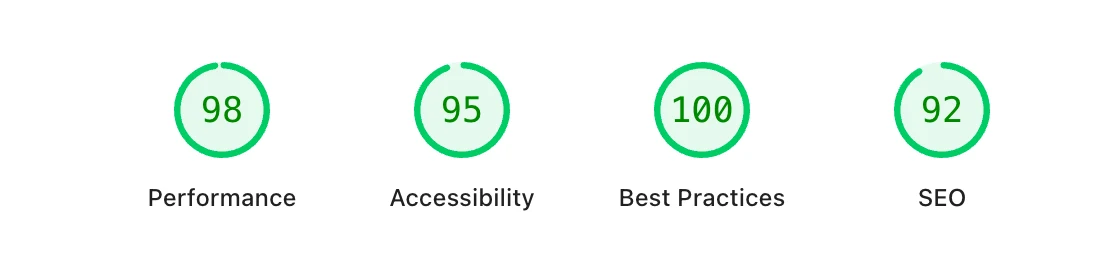
Run your homepage and your two busiest service pages through Google PageSpeed Insights and read the mobile tab, not desktop. Mobile is throttled to imitate a normal phone on a cell connection, much closer to how your customers see the site.
Your Site and Your Google Business Profile Have to Agree
Your Google Business Profile is usually the second place a prospect looks, and it is where the story either holds up or falls apart.
- Name, address, and phone match exactly across your website footer, your contact page, your profile, and the big directories. Same suite number, same phone, same spelling.
- Service areas line up. If your profile claims six cities and your site only ever talks about your home base, Google has no reason to believe the other five.
- Use the same service names in both places. Google reads your pages, not just your profile list.
- Show your Google reviews on the site. Strong reviews on the profile and none on the homepage is a gap a visitor will notice.
A Thirty Day Fix List
Week 1
Rewrite your homepage headline so it names the service and the city. Put the phone number in the header, tap-to-call on mobile, and confirm it is the same number on your Google Business Profile.
Week 2
Check that your name, address, and phone match everywhere. Add LocalBusiness schema. Put your license number and insured status in the footer.
Week 3
Build or tighten a dedicated page for each core service. Replace every stock photo with a real one from a job you did. Caption them with the service and the town.
Week 4
Embed live Google reviews on the homepage, cut your contact form to four fields, run PageSpeed Insights, and compress anything oversized.
None of this is complicated. It is just the stuff that quietly never gets done, which is exactly why doing it puts you ahead of most of the trucks parked on your street.
Questions We Get
Which fix should I make first?
Open your homepage on your phone and give it five seconds. If a stranger could not tell what you do, where you do it, and how to call you, start there. Everything else is second.
How many city pages do I need?
One for each town where you actually work and can add something real: local photos, a review from that area, specifics about the neighborhoods. If you cannot write anything true and specific about a city, do not build the page.
Do I need a redesign or just fixes?
Usually just fixes. A site that loads fast and has a clear headline, real photos, and an easy phone number will out-earn a beautiful site that hides all four. Rebuild when the site fights you every time you try to change something.